
About This Directory
This online directory contains information about faculty and staff at the University of Alaska. In addition to the information commonly found in telephone books, this directory also contains information such as university email addresses and links to personal web pages, if they exist. Note that information obtained here is not guaranteed to be accurate. Fields containing information such as titles, web page URLs, and fax numbers are user-editable and may not accurately reflect employee data supplied by Human Resources. Use this data at your own risk.
Updating Directory Information
Individual Listings
Employees
Use the self-service feature to update your primary department affiliation, title, office building, room number, fax number, and other information.
Students
Directory listing for students are not currently enabled at this time.
Name changes
The University of Alaska recognizes that many members of its community use names other than their legal names to identify themselves. Individual's may elect to use a chosen/preferred first name in the university directory, and select university-related systems and documents, provided that the chosen/preferred first name is not being used for the purpose of misrepresentation. The official/legal name will continue to be used in all university-related systems and documents that require a verified legal name.
How-to Set a Preferred First Name
- Login to UA Online
- Click Personal Information
- Then click Chosen/Preferred First Name
- Enter your preferred first name, then click Submit
How-to Perform a Legal Name Change - Students
- Login to UA Online
- Click the Personal Information tab
- Click the name change information
- Fill out the form
- Send the completed form to the local registrar
How-to Perform a Legal Name Change - Faculty/Staff
- Employees should submit a change form located on the UA HR forms site.
E-Mail Address
The Online Directory should always display your University of Alaska provided e-mail address, even if you have otherwise set a preferred e-mail address, or setup a mail forward on your account.
Office Telephone Number
To request a change your university office telephone number, please contact the IT Services Technical Support Center via e-mail at uaa.techsupport@alaska.edu, or via phone at (907) 786-4646, or toll-free at 1 (877) 633-3888.
Department/Program Listings
Each university department, office, or unit has one or more delegates who are responsible for maintaining directory information in the Online Directory.
Directory delegates are frequently administrative assistants or office support staff. It is helpful for the delegates to be familiar with - or even involved with - personnel paperwork so that updating the department listings occurs at the same time as staff changes.
It is recommended that a department have at least one delegate besides the manager, the manager is always a delegate; however, the number of delegates should be kept to a reasonably small number, usually less than five (5) people in total including the manager. Departments with an exceptionally high number of delegates may be contacted by IT Services regarding reviewing and reducing the number of delegates listed.
Update a Current Listing
The directory delegate(s) for the unit may update department/program listings via either the Self-service, or by submitting a Directory Listing form. Information updated via Self-Service is immediately applied to the Online directory; however, it may take some time to replicate across all the servers which host the information. Update requests submitted via the Directory Listing form are typically completed within 4 to 5 business days from the date of submittal.
Update Your Unit's Directory Delegates
To update a Directory Delegate for your unit, the unit head, or an existing delegate, may either use Self-Service to add/remove delegates directly, or send the following information to uaa.techsupport@alaska.edu:
- Name of the unit
- The UA Username of the delegate(s) to be removed
- The UA Username of the delegate(s) to be added
Request a New Listing
Units may request a new listing at any time. Before making a request, search the Online Directory site to make sure the unit is not already listed. Subunits are often listed as part of the parent unit listing. Duplicate listings are not allowed.
To make a request for a new listing, the department head should determine who on their staff will serve as the directory delegate(s). The directory delegates are responsible for approving their unit's Directory content and updating the Directory site. Individual units are responsible for determining their own process for collecting and maintaining their department directory information.
To initiate a request for a new listing, the department head must fill out the Directory Listing form. Upon submitting the form, the Directory request is reviewed for completeness, and once reviewed and approved, new entries are typically created within 4 to 5 business days.
Remove a Current Listing
The department/unit head should fill out the Directory Listing form. Upon submitting the form, the Directory removal request is typically completed within 4 to 5 business days.
Self-Service
The Online Directory offers the ability for individuals, as well as department/program delegates to edit selective information directly. This is referred to as Self-Service.
The following provides a listing of the directory information that can, and cannot be changed via Self-Service. These are, but not limited to, the following:
| Individual | Department/Program | |
|---|---|---|
| Self-Service |
|
|
| Not Self-Service |
|
|
How-to Use Self-Service
- Go to the Online Directory site.
- Click the Log in button located at the top right of the page.

- Enter your UA Username and password, then click Login
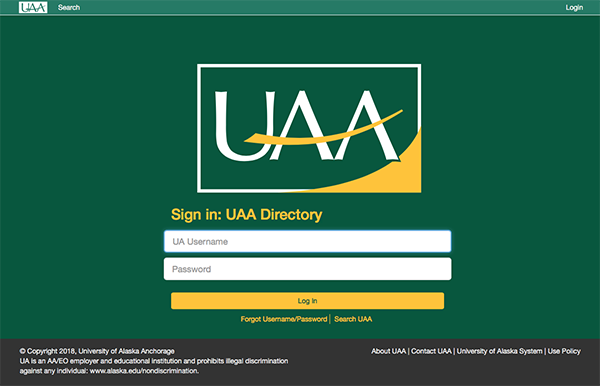
- After a successful login, edit the desired information following the steps below for either Individual, or Department self-service.
Individual Self-Service
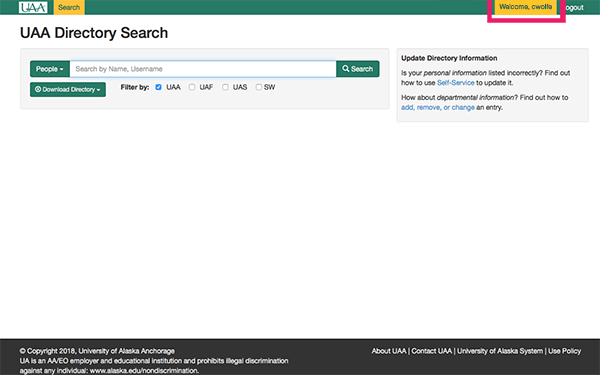
- After login, click the Welcome, <Your UA Username> text at the top right of the page.
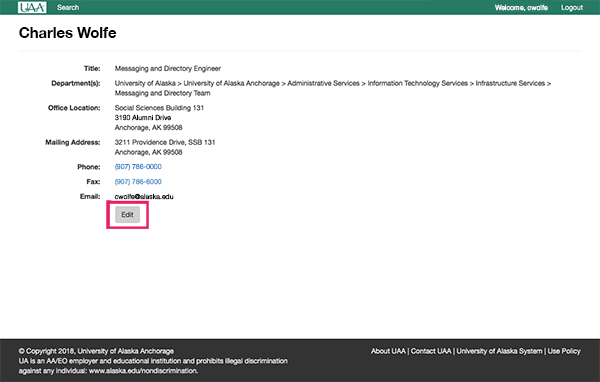
- You will be taken to your directory entry, click the edit button.
- You will be presented with a screen similar to the following.
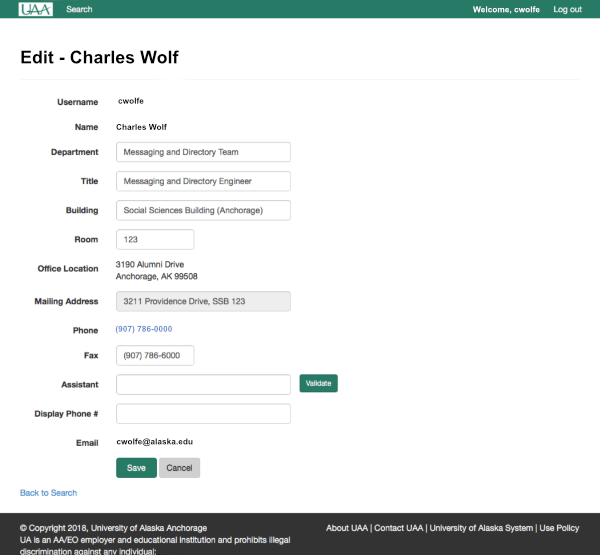
- To change one, or more, of the attributes listed in the Attribute Summary table above click on the desired field.
Please be aware of the following considerations when making changes.
- Department: This sets a person's primary department affiliation for those individuals with more than one job assignment; however, it does not add, or remove the person from the actual department listing. Only department delegates, or IT Services, can change membership for department listings.
- Building: When changing the building name you will have a list appear that will dynamically update as you type with a list of university buildings. Please select the appropriate building from the list. Employee's with multiple office locations should select the building that represents your primary office.
- Room: Employees should enter the physical room number of their primary office. Please Note: This must be the number as posted outside of your primary office door, and not the room number of the office suite, if applicable, that your office is located within.
- Office Location: The office location address will automatically update based upon the selected building.
- Mailing Address: The mailing address will automatically update based upon the selected building for those locations with a predefined mailing address and will be un-editable. Otherwise, you will be able to enter an appropriate mailing address (e.g. PO Box 12345).
- Fax: If applicable, enter your office fax number as a valid 10-digit (e.g. 9077860001) UA fax number.
- Assistant: For individuals with an assistant, enter the individual's UA Username (e.g. cwolfe) in the field and click the Validate button to ensure a person can be found, otherwise if a person can not be identified a No results found message will be displayed.
- Display Phone #: For individuals that would like to have a number displayed in the directory other than your primary office phone number, enter a valid 10-digit (e.g. 9077860011) UA telephone number.
- After updating the desired fields, click the Save button.
Department Self-Service
- After login at the Directory Search page click
the People drop-down button, and select Departments.

- In the Search field type the name of the department you want to edit, if desired select a filter by option, then click search.
- From the search results, find the desired listing you want to edit. If you have been designated as
a delegate you will see a button labeled Edit. Click the edit
button.
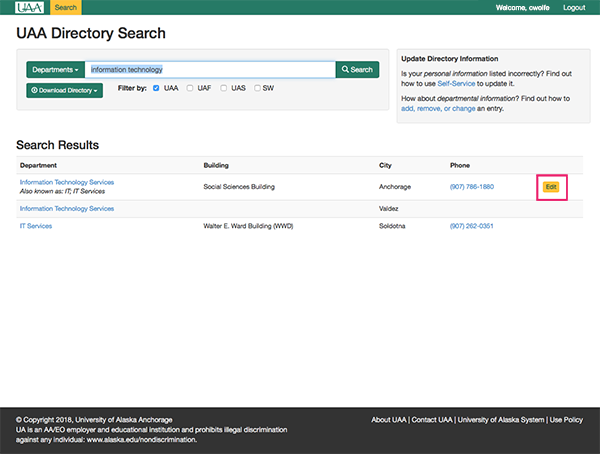
- You will be presented with a screen similar to the following:
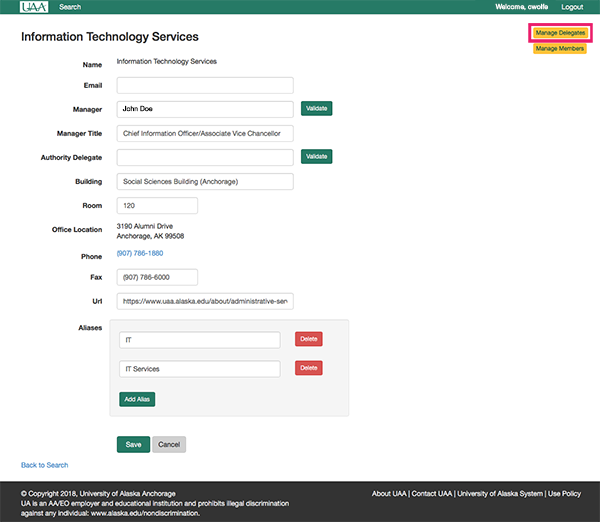
- To change one, or more, of the attributes listed in the Attribute Summary table above click on the desired field.
Please be aware of the following considerations when making changes.
- Email: This sets a department's primary email address (e.g. uaa.some.department@alaska.edu) by which they can be contacted. This should not be an employee's personal email address (e.g. cwolfe@alaska.edu).
- Manager: Enter the UA Username (e.g. cwolfe) for the individual in charge of the department/program. Click the Validate button to ensure a person can be found, otherwise if a person can not be identified a No results found message will be displayed.
- Manager Title: Enter the title associated with the position of the head of the department/program (e.g. Director). Please do not enter the full title of the person that is currently filling that position, especially in cases where their full title represents elements other than the position as head of the department (e.g. Director, Instructor of Astrophysics, and SETI Researcher).
- Authority Delegate: Enter the UA Username (e.g. cwolfe) for the individual that is delegated authority for the department when the department head is not available. Click the Validate button to ensure a person can be found, otherwise if a person can not be identified a No results found message will be displayed.
- Building: When changing the building name you will have a list appear that will dynamically update as you type with a list of university buildings. Please select the appropriate building from the list. Employee's with multiple office locations should select the building that represents your primary office.
- Room: Departments should enter the physical room number of that corresponds to their main office door.
- Office Location: The office location address will automatically update based upon the selected building.
- Mailing Address: The mailing address will automatically update based upon the selected building for those locations with a predefined mailing address and will be un-editable. Otherwise, you will be able to enter an appropriate mailing address (e.g. PO Box 12345).
- Fax: If applicable, enter the department's fax number as a valid 10-digit (e.g. 9077860001) number.
- URL: Enter the web address (i.e. URL) of the department's website (e.g. https://www.uaa.alaska.edu). If you're not sure, navigate to the website in a separate web browser/tab then copy the URL and paste it into this field.
- Aliases: Departments may enter one, or more, alternative names for their organization to improve search results in the directory. These can be abbreviations, former names the department was known by, or other similar references.
- To add, or remove a person's ability to edit the department listing click Manage Delegates

- You will be presented with a screen similar to the following
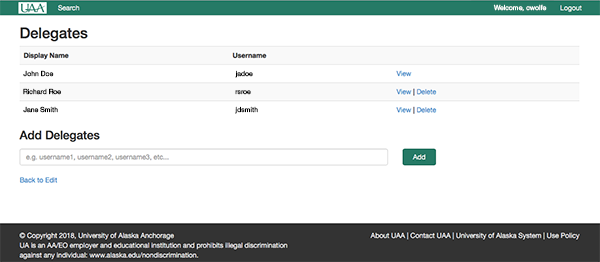
- To remove delegate access click the Remove button. Note: A manager will always have delegate rights to edit a department list. To remove a manager please update the manager listing on the main department edit page.
- To add a delegate enter the person's UA Username into the field beneath the Add Delegates label. You may enter more than one at a time by using a comma to seperate the values. Click the Add button when finished.
- When finished click Back to Edit button to return to the main department edit form.
- You will be presented with a screen similar to the following
- To add, or remove a person from the department listing click Manage Members

- You will be presented with a screen similar to the following

- To remove member click the Remove button next to their name.
- To add a member enter the person's UA Username into the field beneath the Add Members label. You may enter more than one at a time by using a comma to seperate the values. Click the Add button when finished.
- When finished click Back to Edit button to return to the main department edit form.
- You will be presented with a screen similar to the following
Changes are immediately applied to the online directory; however, it may take some time to replicate across all the servers which host the information.
Downloadable Directories
There are two ways to access directory information. The first is to simply use the Online Directory site to search for the desired person or department. The other is to click the Download Directory link and select either the People or Departments option. This will cause a PDF file to be downloaded to your device for the listing selected.
Please note the following considerations about the downloadable directory listings:
- The information included in the downloadable PDF files is updated once a day
- We strongly discourage actually printing either of the PDF files because they are out-of-date almost at the moment that they are printed
Appropriate Use of Online Directory Information
The Online Directory is intended to be a tool to search for university personnel. It is inappropriate to use the Online Directory for:
- Sending unwanted or harassing email messages or spamming
- As a verification of employment
Report a Problem
See a problem with a directory entry that you can't fix? See something that appears strange? Please report any directory problems to the IT Services Technical Support Center via e-mail at uaa.techsupport@alaska.edu, or via phone at (907) 786-4646, or toll-free at 1 (877) 633-3888. Be sure to include details to help us understand which directory listing you're looking at.
Thank you!